
Korea trip planner app versus spreadsheet itinerary workflow
How to decide what belongs in a Korea trip planner app, what belongs in a spreadsheet, and how to keep both useful during a Seoul trip.
Quick answer
Use a Korea trip planner app for live information, route checks, saved places, and on-the-ground search. Use a spreadsheet for the decisions that need to stay visible across the whole trip: day order, hotel area, food backups, budget notes, map links, reservations, and what to cut when the day runs long. The strongest workflow is not app versus spreadsheet. It is app for movement, spreadsheet for structure.
Start with the job each tool does best
Korea travel planning usually breaks when one tool is asked to do every job. A map app is excellent when you need the next route, the correct branch, the nearest subway exit, or a backup cafe near where you already are. A spreadsheet is better when you need to compare multiple days, share decisions with a group, track reservations, see which neighborhoods are overloaded, and avoid rebuilding the itinerary from scratch every morning.
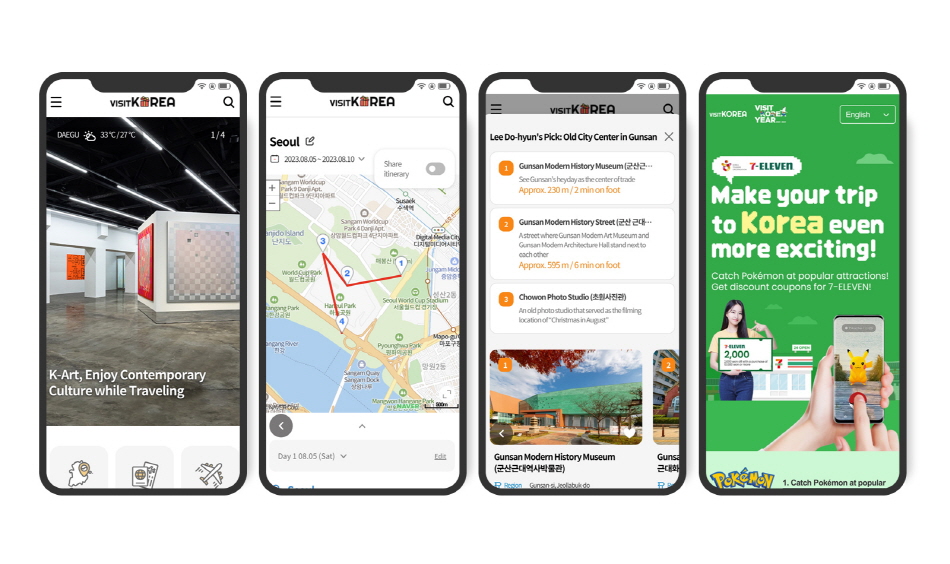
VISITKOREA's current mobile app article says the app now works as a broader Korea travel platform, with travel information, suggested itineraries, and a Travel Planner feature for creating plans based on traveler preferences. The site also has a Plan Your Trip section with Travel Planner, Make New Plan, Itinerary Board, and My Travel Plans areas. That is useful for discovery and rough trip shaping.
For actual Seoul movement, VisitKorea's helpful-apps guide still points travelers toward local tools. Its June 2026 page describes Naver Maps as widely used in Korea, with route suggestions, estimated travel time by mode, reviews, business details, related links, and bookmarks. KakaoMap's official page says it finds routes for public transit, car, walking, and bike, using information updated within the past 24 hours.
Those are real strengths. But they do not remove the need for a planning layer that keeps the whole trip coherent. Apps answer "how do we get there now?" The spreadsheet answers "should this stop be in this day at all?"
If you want the high-level structure already separated into itinerary, maps, bookings, and trip admin, keep the planning layer in the Seoul trip planner template and use apps to verify the rows.
Let apps handle live movement
Trip planner apps and map apps should own the changing parts of the day. Seoul routes can shift with traffic, weather, subway transfers, bus timing, closing days, and the branch you actually selected. Do not try to freeze every detail in a spreadsheet before departure.
Use apps for:
- Route testing: Check the hotel-to-first-stop route, not only the station name.
- Live transit decisions: Compare subway, bus, walking, and taxi when the day changes.
- Place verification: Confirm the branch, district, entrance, floor, photos, and recent details.
- Nearby search: Find a cafe, pharmacy, convenience store, restroom, or meal backup near the current route.
- Bookmarking: Save ideas before the trip, especially when Korean names or map results are hard to reproduce later.
- Language recovery: Keep Korean names, addresses, or screenshots ready when English search results are inconsistent.
This is especially important in Korea because English names, romanized names, Korean names, and mall or station entrances may not line up neatly. The app is where you check the street-level reality. The spreadsheet is where you decide whether the stop is worth keeping.
For map setup details, the related guide to Naver Map versus Kakao Map for Korea trip planning covers the app layer more directly.
Let the spreadsheet handle the trip logic
A spreadsheet should not try to imitate a map app. Its job is to make tradeoffs visible. If every saved cafe is treated as equal, the itinerary turns into a wish list. If every row has a role, the group can make faster decisions.
Use the spreadsheet for:
- Day structure: Morning, lunch, afternoon, dinner, and night blocks.
- Neighborhood discipline: Which area each day is built around, and which areas do not belong together.
- Priority: Must-do, nice-to-have, backup, and skip-if-tired.
- Reservations: Confirmation numbers, time windows, deposit notes, ticket links, and cancellation risk.
- Food planning: Main meal, backup meal, snack, dietary notes, and whether the stop fits the route.
- Weather backup: Rain, heat, cold, fine dust, and indoor alternatives.
- Budget notes: Transit-heavy days, shopping days, cash needs, tax refund reminders, and payment backup.
- Group agreement: Who requested the stop, who cares about it most, and whether everyone needs to go.
The spreadsheet is also where conflicts become obvious. A day with three neighborhoods, two destination meals, a timed palace visit, and a late shopping plan is not flexible. It is fragile. Seeing that on one sheet lets you cut one thing before the route becomes tiring.
A Korea-ready workflow
The cleanest workflow has three passes.
First, collect ideas in apps and official travel pages. Save attractions, markets, restaurants, cafes, clinics, events, shopping streets, and transport notes without trying to schedule them yet. At this stage, quantity is fine.
Second, move only serious candidates into the spreadsheet. Give each row a day, neighborhood, priority, purpose, nearest station, Korean name or address, Naver Map link, Google Maps link if useful, reservation status, food note, and backup value. If you cannot explain why the row belongs in the day, leave it in the idea list.
Third, route-check each day in the app. Open the first two or three movements, not every single saved place. Check whether the day depends on one awkward transfer, a long walk, a bus with poor timing, or a shopping stop that creates luggage problems. Then return to the spreadsheet and adjust the order.
Repeat that cycle when something changes. Do not rebuild the whole trip inside the app. Do not treat the spreadsheet as fixed once the app shows a better route. Each tool should correct the other.
When the app should lead
Let the app lead when the decision depends on current location or live conditions. That includes choosing a meal near the current station, checking a late-night ride, confirming a branch, finding a pharmacy, or replacing an outdoor stop during heavy rain.
It should also lead for the first hour after landing. Airport exits, train platforms, bus stops, hotel entrances, and taxi pickup points are easier to handle with a live route and saved Korean destination details. The spreadsheet can hold the plan, but the app should guide the movement.
The same applies to neighborhoods with many small stops. In Seongsu, Yeonnam, Ikseon, Hannam, Mangwon, or Myeongdong, your plan may include one anchor and several nearby options. Once you are there, the app can help decide which option is closest, open, or easiest to reach next.
When the spreadsheet should lead
Let the spreadsheet lead when the decision affects the whole trip. Hotel base, day order, KTX timing, Jeju or Busan add-ons, shopping days, clinic downtime, market food pacing, and group priorities should not be decided from one map screen.
The spreadsheet should also lead when travelers disagree. A map app can show that two places are close. It cannot show that one person cares about skincare shopping, another cares about cafes, and someone else needs a lower-stairs day. Put that conflict in columns so the group can choose deliberately.
For short trips, the most important spreadsheet column is the cut rule. Write what disappears first if the day runs long. A second cafe, an extra shop, a distant night view, or a low-priority photo stop should be marked before anyone gets tired.
What each itinerary row should hold
A useful Korea itinerary row needs enough information to survive an app switch, a language mismatch, and a tired group.
- Place name: English name plus Korean name when available.
- Area: Neighborhood or district, not just city.
- Purpose: Meal, sight, shopping, cafe, transfer, appointment, backup, or rest.
- Priority: Must-do, flexible, backup, or cut first.
- Map links: Naver Map as the working local link, plus Google Maps or KakaoMap when useful.
- Transit note: Nearest station, exit, bus stop, taxi-ready address, or luggage issue.
- Timing: Reservation time, opening-day caution, weather dependency, or rough time block.
- Backup: Nearby indoor stop, easier meal, simpler cafe, or return-to-hotel option.
This keeps the app workflow lighter. You do not need to search from memory. You open the row, tap the map link, verify the route, and move.
SeoulSheets connection
SeoulSheets works best as the control layer between discovery apps and live navigation. Use one tab for the day-by-day itinerary, one for saved food and cafe candidates, one for map links and Korean names, one for reservations, and one for budget and payment notes. Then let Naver Map, KakaoMap, VISITKOREA, and other apps feed verified details into those rows.
The point is not to replace travel apps. It is to stop the trip from becoming a stack of disconnected pins. When every row has a purpose, a map link, a backup, and a cut rule, the group can use apps confidently without losing the larger plan.
Final take
Choose apps for live answers and the spreadsheet for trip decisions. Korea travel is smoother when Naver Map, KakaoMap, VISITKOREA, bookings, and saved places all feed one itinerary workflow instead of competing for attention. A good spreadsheet does not make the trip less spontaneous. It makes the spontaneous changes easier to handle.